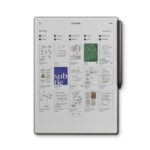
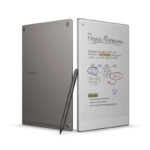
reMarkable Paper Pro with Markerplus

Brand:

reMarkable Paper Pro with Marker Plus Key Features

  • 11.8-inch Canvas Color display with natural light reflection
  • Marker Plus stylus with tilt sensitivity and magnetic attachment
  • Handwriting-to-text conversion and PDF annotation
  • Cloud sync and multi-device access
  • Lightweight, durable, and distraction-free design
  • 14-day battery

Original price was: KSh 104,000.Current price is: KSh 97,500.

NB: Warranty registration is the customer’s responsibility.

Disclaimer: We cannot guarantee that the product specifications information on this page is 100% correct.

Cash on Delivery within Nairobi

Pay on Order outside Nairobi


Need help or feeling stuck? Call us anytime:
0728 270 084 or
0727 109 200.
We’ve got you.


reMarkable Paper Pro with Marker Plus Price in Kenya, Full Specifications & Review (2026)

The reMarkable Paper Pro with Marker Plus price in Kenya is KES 97,500. This is reMarkable’s most advanced digital paper tablet, built for professionals, creatives, academics, and serious note-takers who want the most authentic paper-like writing and reading experience available on a digital device today.

reMarkable designed the Paper Pro around one clear purpose. It is a focused, distraction-free tool for writing, reading, sketching, and document annotation without the notifications, apps, and interruptions that come with tablets and laptops. As a result, it helps users stay deeply focused on their work in a way that general-purpose devices cannot replicate.

The Paper Pro introduces the Canvas Color e-paper display, which is reMarkable’s first color e-paper screen. This brings color document reading and annotation to the reMarkable experience for the first time. Furthermore, the Marker Plus with tilt sensitivity and a built-in eraser, handwriting-to-text conversion, live screen sharing, cloud sync with Google Drive, Dropbox, and OneDrive, and up to 14 days of battery life combine to make the Paper Pro the most capable digital paper device available in Kenya at this price.

You can buy the reMarkable Paper Pro with Marker Plus from Phonesstore Kenya. They offer genuine reMarkable products, competitive pricing, and nationwide delivery across Kenya.

reMarkable Paper Pro Full Specifications

Product Feature Specification
Brand reMarkable
Model Paper Pro
Type Digital Paper Tablet
Operating System Codex OS
Processor Dual-core
Display Feature Specification
Display Size 11.8 inches
Display Technology Canvas Color e-paper
Display Quality Natural light reflection, glare-free
Reading Light Yes, adjustable
Color Support Yes, color e-paper
Stylus Feature Specification
Stylus Included Marker Plus
Tilt Sensitivity Yes
Built-in Eraser Yes
Attachment Magnetic
Battery Not specified (check reMarkable official)
Productivity Feature Specification
Handwriting to Text Yes
PDF Annotation Yes
Live Screen Sharing Yes
Note Organization Yes
Encrypted Storage Yes
Cloud Feature Specification
Cloud Sync Yes
Google Drive Yes
Dropbox Yes
OneDrive Yes
Multi-Device Access Yes
Connectivity Feature Specification
Wi-Fi Yes
USB-C Yes
Battery Feature Specification
Battery Life Up to 14 days
Design Feature Specification
Design Slim, lightweight, distraction-free
Build Durable premium construction
Price Feature Specification
Price in Kenya KES 104,000

Design and Build Quality

The reMarkable Paper Pro is built around a philosophy of deliberate simplicity. The slim and lightweight aluminum body houses an 11.8-inch display without unnecessary bulk. As a result, it feels closer to holding a premium notebook than a tech device. The refined finish and minimal aesthetic make it look at home on a desk, in a meeting room, or in a creative studio.

The distraction-free design is intentional throughout. There are no app stores, no social media, no notifications, and no multimedia entertainment features. So when you pick up the Paper Pro, you are not tempted to drift into browsing or checking messages. Furthermore, this focused design is precisely what makes it such a productive tool for deep work, long writing sessions, and focused reading.

The Marker Plus attaches magnetically to the side of the device and stays in place securely during transport. The magnetic connection is clean and snaps into position without needing to search for the right attachment point. Furthermore, the built-in eraser at the top of the Marker Plus means correcting handwritten content is natural and intuitive, exactly like erasing pencil on paper.

Canvas Color Display

The Canvas Color e-paper display is the most significant upgrade the Paper Pro introduces over the reMarkable 2. For the first time, reMarkable users can read color documents, annotate color PDFs, sketch with color awareness, and view color-coded notes on a device that still feels like paper.

E-paper technology reflects ambient light like a physical page rather than projecting backlight at the reader’s eyes. As a result, the Canvas Color display is glare-free and comfortable for extended reading sessions in ways that tablet screens cannot replicate. Whether reading in a brightly lit office, outdoors, or near a window, the display remains clear and natural-looking without the eye fatigue that backlit screens create over time.

The adjustable reading light allows comfortable use in dim environments including evening work sessions and low-light meeting rooms. So the Paper Pro is a genuinely all-day and all-condition reading and writing tool that adapts to different environments throughout the day.

Marker Plus Writing Experience

The Marker Plus stylus is central to what makes the reMarkable Paper Pro exceptional. The tilt sensitivity detects the angle at which you hold the stylus and adjusts the stroke character accordingly. So tilting the pen for shading produces a broader and softer mark, while holding it upright produces a fine precise line. As a result, sketching and handwriting on the Paper Pro feels meaningfully more natural and expressive than pressure-only styluses that do not account for tilt.

The built-in eraser at the top of the Marker Plus allows instant correction by flipping the stylus, exactly as you would with a pencil and eraser on paper. This workflow is natural and instinctive, so correcting mistakes does not interrupt the creative or note-taking flow. Furthermore, the magnetic attachment keeps the Marker Plus on the device and immediately accessible at all times.

The e-paper surface has a slight texture that creates physical friction against the pen tip, which contributes to the paper-like writing feel. This resistance is more satisfying and natural for handwriting and sketching than the frictionless glass surface of tablet screens. So the combined effect of tilt sensitivity, the surface texture, and the Marker Plus design creates a writing experience that is widely considered the most paper-accurate available on any digital device.

Productivity Features

The reMarkable Paper Pro is a serious productivity tool beyond its writing and reading capabilities. Handwriting-to-text conversion recognizes handwritten notes and converts them into typed digital text. As a result, handwritten meeting notes, journal entries, and brainstorming sessions become searchable and shareable digital documents without manual retyping.

PDF annotation allows professionals and students to mark up documents, add comments, draw diagrams, and highlight key sections directly on the page with the Marker Plus. So reading a research paper, marking up a contract, or reviewing a design mockup becomes an interactive and productive experience rather than a passive one.

Live screen sharing is one of the Paper Pro’s most useful professional features. It allows the screen to be shared with a connected display or meeting participants in real time. So using the Paper Pro to take notes, sketch diagrams, or annotate documents during presentations and teaching sessions makes the content immediately visible to everyone in the room. Furthermore, this feature works without requiring complex software or additional hardware setup.

Cloud Sync and Multi-Device Access

Cloud sync with Google Drive, Dropbox, and OneDrive ensures that documents, notes, and annotated PDFs are accessible across devices and platforms. So a PDF annotated on the Paper Pro during a commute is immediately available on a laptop or desktop computer when you get to your desk. Furthermore, notes created during a meeting sync to cloud storage and can be accessed from anywhere with an internet connection.

This multi-platform cloud integration is a meaningful practical advantage over devices that lock content into a proprietary ecosystem. The Paper Pro works within the existing cloud workflows that most professionals and students already use. So adoption does not require changing habits or migrating content between systems.

Encrypted storage adds a layer of data security for professionals who handle sensitive documents and confidential notes. So legal, medical, financial, and academic users can trust that their content is protected on the device itself.

Battery Life

The 14-day battery life is one of the reMarkable Paper Pro’s most practically useful specifications. Like all e-paper devices, the Canvas Color display consumes power only when the screen content changes rather than continuously like a backlit panel. As a result, the battery lasts significantly longer than any tablet or laptop alternative.

In everyday practical terms, 14 days of battery life means most users charge the Paper Pro roughly twice a month. So charging becomes an occasional event rather than a daily task, which removes one more friction point from the daily workflow. Furthermore, for extended trips, multi-day conferences, and international travel, the long battery life means carrying a charger is rarely a concern.

Charging via USB-C makes the Paper Pro compatible with the same chargers used for laptops, smartphones, and tablets. So no proprietary charging accessories are needed beyond the standard USB-C cable.

Codex OS and Focused Experience

The reMarkable Paper Pro runs Codex OS, reMarkable’s purpose-built operating system designed specifically for focused digital paper use. It does not run Android, iOS, or any general-purpose operating system. As a result, there is no app store, no social media, no web browser, and no email client on the device itself.

This intentional restriction is the Paper Pro’s most polarizing feature and simultaneously its greatest strength for focused work. Users who want a device specifically for writing, reading, and thinking without digital distraction will find Codex OS liberating. Furthermore, the simplified interface makes learning the device quick and the workflow clean.

However, buyers who want a device that also handles general computing, entertainment, or web browsing should be aware that the Paper Pro is not designed for those use cases. It is specifically and deliberately a focused tool for writing and reading.

Pros and Cons

Pros

  • Canvas Color e-paper display is reMarkable’s first color screen, enabling color document reading and annotation with a natural paper-like feel
  • Marker Plus with tilt sensitivity and built-in eraser delivers the most paper-accurate digital writing experience available
  • Distraction-free Codex OS removes apps, notifications, and entertainment to support deep focused work
  • Handwriting-to-text conversion makes handwritten notes searchable and shareable digitally
  • Cloud sync with Google Drive, Dropbox, and OneDrive fits into existing professional workflows without ecosystem lock-in
  • Live screen sharing supports real-time collaboration in meetings and teaching environments
  • 14-day battery life makes daily charging unnecessary and extends travel usability significantly
  • Encrypted storage protects sensitive documents for professional users
  • Glare-free e-paper is comfortable for extended reading in all lighting conditions including direct sunlight
  • Adjustable reading light makes the device usable in low-light environments

Cons

  • KES 104,000 is a significant investment that reflects the premium nature of the device
  • No third-party app store limits the device to reMarkable’s focused feature set
  • No multimedia capabilities including music, video, or general web browsing
  • Color display is e-paper rather than AMOLED, so color vibrancy and video content are not applicable use cases
  • Works best alongside a reMarkable cloud subscription for full feature access
  • Not suited for buyers who need a general-purpose tablet alongside reading and writing

Where to Buy reMarkable Paper Pro in Kenya

You can buy the reMarkable Paper Pro with Marker Plus from Phonesstore Kenya. They stock genuine reMarkable products with reliable service and nationwide delivery across Kenya.

reMarkable Paper Pro vs Amazon Kindle Scribe with Premium Pen

The reMarkable Paper Pro at KES 104,000 and the Amazon Kindle Scribe at KES 53,000 are the two most capable digital writing and reading tablets available in Kenya today. Both use e-paper displays and include a premium stylus. However, they serve subtly different buyer priorities.

The Paper Pro steps ahead with a larger 11.8-inch display versus the Scribe’s 10.2-inch screen, a Canvas Color e-paper display for color document viewing, tilt-sensitive writing with the Marker Plus, live screen sharing for meetings and teaching, and cloud sync with Google Drive, Dropbox, and OneDrive. Furthermore, Codex OS provides a more focused and distraction-free environment than the Kindle’s Amazon ecosystem.

The Kindle Scribe counters with a lower KES 53,000 price, Amazon’s extensive e-book library with direct Kindle store access, Audible audiobook support, and a more familiar device ecosystem for existing Amazon customers. So for buyers who want the most advanced digital paper experience and color document support, the Paper Pro is the right investment. For buyers who primarily want to read Kindle books and add note-taking capability at half the price, the Kindle Scribe is the smarter choice.

reMarkable Paper Pro vs reMarkable 2 with Marker Plus

The reMarkable 2 is the previous-generation model and is available at a lower price. The Paper Pro steps ahead with the Canvas Color e-paper display, which the reMarkable 2 does not have. Furthermore, the Paper Pro’s larger display, improved Marker Plus with enhanced tilt sensitivity, and live screen sharing add meaningful capability upgrades. So for buyers who can afford the Paper Pro, it is the more future-proof and capable investment. The reMarkable 2 remains a strong option for buyers who do not need color display support and want to save on cost.

FAQs

What is the reMarkable Paper Pro price in Kenya? The reMarkable Paper Pro with Marker Plus price in Kenya is KES 104,000 at Phonesstore Kenya.

Does the reMarkable Paper Pro have a color display? Yes. The Canvas Color e-paper display is reMarkable’s first color screen, enabling color document reading and annotation with a natural paper-like feel.

Does the Marker Plus need charging? The Marker Plus charging specifications were not confirmed at time of writing. Check Phonesstore Kenya or reMarkable’s official website for the latest details.

How long does the reMarkable Paper Pro battery last? Up to 14 days, making daily charging unnecessary for most users.

Can I annotate PDFs on the reMarkable Paper Pro? Yes. PDF annotation is a core feature, allowing handwritten comments, highlights, and diagrams directly on document pages.

Does the reMarkable Paper Pro sync with Google Drive? Yes. It syncs with Google Drive, Dropbox, and OneDrive for multi-platform document access.

Can I use the reMarkable Paper Pro for meetings? Yes. The live screen sharing feature allows real-time sharing of notes and diagrams with meeting participants and connected displays.

Does the reMarkable Paper Pro have an app store? No. It runs Codex OS, which is a focused operating system without a third-party app store. This is intentional for distraction-free work.

Is the reMarkable Paper Pro good for students? Yes. PDF annotation, handwriting-to-text conversion, cloud sync, and the distraction-free environment make it an excellent academic tool for students who read and annotate extensively.

How does the reMarkable Paper Pro compare to the Kindle Scribe? The Paper Pro offers a larger color e-paper display, tilt-sensitive writing, live screen sharing, and broader cloud sync. The Kindle Scribe offers Amazon’s e-book ecosystem and a lower price. See the comparison section above for full details.


Explore the latest tablets and accessories at Phonesstore Kenya.

Internal Storage

Reviews

There are no reviews yet.

Be the first to review “reMarkable Paper Pro with Markerplus”