
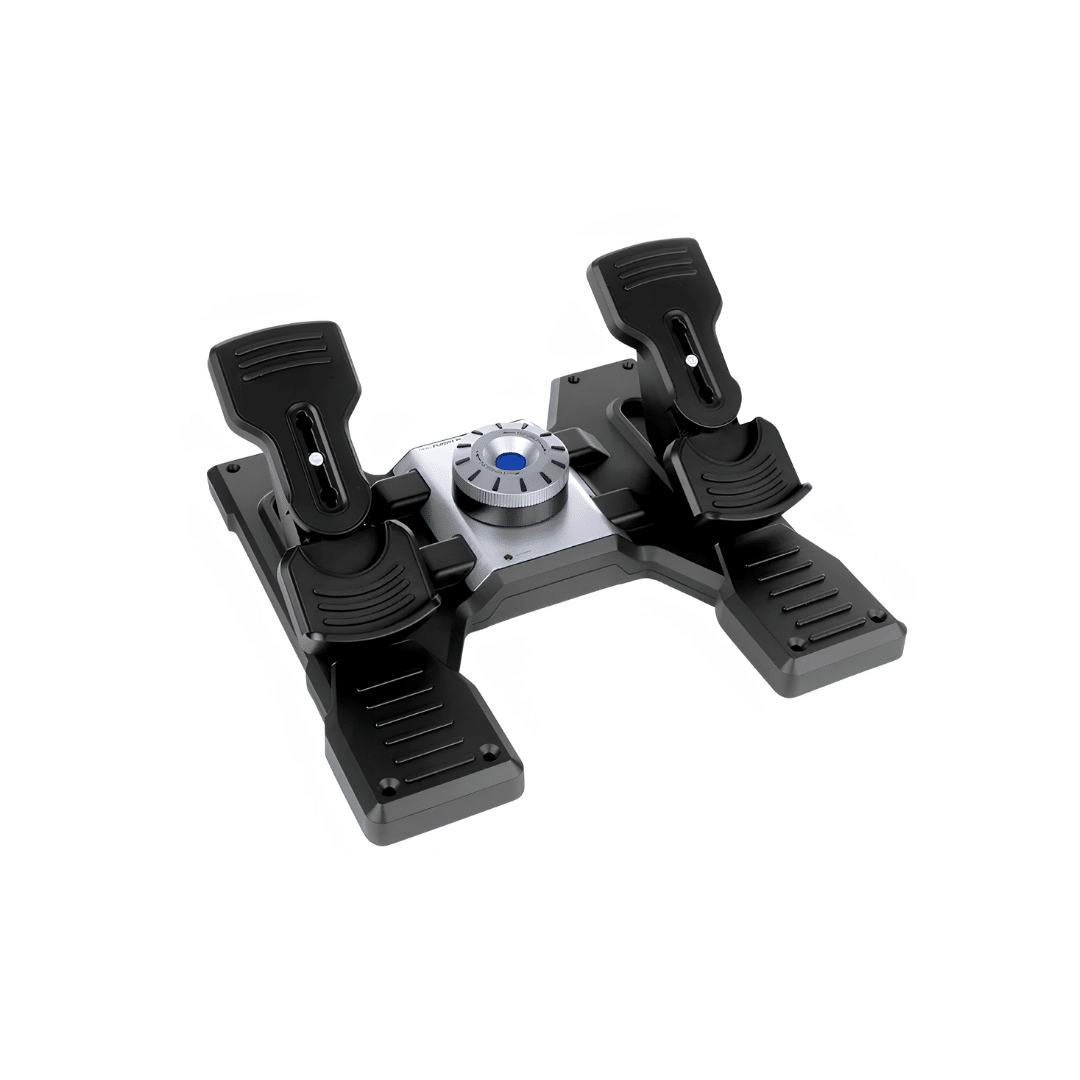
Logitech Flight Simulator Rudder Pedals
Logitech G Flight Simulator Rudder Pedals Key Features
- Realistic aircraft rudder control for immersive flight simulation
- Differential toe brakes improve steering precision during taxiing and landing
- Adjustable pedal tension for customized responsiveness and comfort
- Self-centering pedals deliver smoother and more natural aircraft handling
- Durable ergonomic non-slip design for extended simulation sessions
- USB plug-and-play connectivity with major PC flight simulator compatibility
KSh 50,000
NB: Warranty registration is the customer’s responsibility.
Disclaimer: We cannot guarantee that the product specifications information on this page is 100% correct.

Cash on Delivery within Nairobi
Pay on Order outside Nairobi
Logitech G Flight Simulator Rudder Pedals Price in Kenya, Full Specifications and Review (2026)
The Logitech G Flight Simulator Rudder Pedals price in Kenya is KES 50,000. These are Logitech’s dedicated rudder pedals for PC flight simulation, combining realistic differential toe brakes for taxiing and landing precision, adjustable pedal tension for customised responsiveness, self-centering pedals for natural aircraft handling, a durable ergonomic non-slip design for extended simulation sessions, and USB plug-and-play connectivity compatible with major PC flight simulators.
Logitech has built the G Flight Rudder Pedals as the essential third axis input device for flight simulation setups that use a joystick or yoke for pitch and roll control. Without dedicated rudder pedals, yaw control and differential braking must be mapped to less intuitive inputs such as joystick twist axes or keyboard keys, producing imprecise and unnatural aircraft control. The Logitech G Rudder Pedals provide a dedicated physical input for each function, enabling the two-feet-and-two-hands flying technique that real aircraft require and that advanced flight simulators are designed to support.
At KES 50,000 in Kenya, the Logitech G Rudder Pedals are the practical entry point into physical rudder pedal control for Microsoft Flight Simulator 2024, X-Plane 12, DCS World, and other major PC flight simulation titles, complementing the Logitech G Flight Stick, Throttle, and Yoke systems that complete a full physical flight simulation cockpit.
You can buy the Logitech G Flight Simulator Rudder Pedals from Phonesstore Kenya, where they are available with competitive pricing and nationwide delivery across Kenya.
Key Features of the Logitech G Flight Simulator Rudder Pedals
- Realistic aircraft rudder control for authentic yaw input in flight simulation
- Differential toe brakes on each pedal for independent left and right wheel braking during taxiing and landing
- Adjustable pedal tension for personalised resistance matching individual simulator preference and foot strength
- Self-centering pedal mechanism for smooth, natural return to neutral between rudder inputs
- Durable ergonomic non-slip design for stable foot placement during extended simulation sessions
- USB plug-and-play connectivity for easy setup without driver installation on major PC platforms
- Compatible with Microsoft Flight Simulator, X-Plane, DCS World, and other major PC flight simulators
Logitech G Flight Simulator Rudder Pedals Full Specifications
Launch
| Feature | Specification |
|---|---|
| Brand | Logitech G |
| Product | Flight Simulator Rudder Pedals |
| Type | Dedicated flight simulation rudder pedals |
| Status | Available |
| Availability | Available in Kenya from Phonesstore Kenya |
Controls
| Feature | Specification |
|---|---|
| Rudder Axis | Yes, full left and right rudder input |
| Toe Brakes | Yes, differential independent per pedal |
| Pedal Centering | Self-centering mechanism |
| Tension Adjustment | Adjustable pedal tension |
Build
| Feature | Specification |
|---|---|
| Design | Ergonomic non-slip construction |
| Durability | Built for extended simulation sessions |
Connectivity
| Feature | Specification |
|---|---|
| Interface | USB plug-and-play |
| Driver Installation | Not required for basic operation |
Compatibility
| Feature | Specification |
|---|---|
| Simulators | Microsoft Flight Simulator, X-Plane, DCS World, and other major PC flight simulators |
| Platform | Windows PC |
Price
| Feature | Specification |
|---|---|
| Price in Kenya | KES 50,000 |
Design and Build Quality
The Logitech G Flight Rudder Pedals are designed around the physical demands of extended flight simulation sessions where feet remain in contact with the pedals for hours at a time during long-haul routes, instrument approach procedures, formation flying, and combat missions. The ergonomic design positions the pedals at a comfortable angle and spacing for natural foot placement without requiring the feet to be held in an uncomfortable or tiring position during sustained use.
The non-slip surface on the pedal faces prevents feet from sliding during the smooth, controlled inputs that precise rudder and brake application requires, particularly during the landing phase where simultaneous rudder corrections and differential braking must be applied with fine control. The stable base construction prevents the pedal unit from sliding across a desk or floor surface during use, maintaining consistent pedal position throughout a session without needing to be repositioned.
The adjustable pedal tension system allows the resistance of the rudder pedal movement to be set to the individual simulator’s preference, matching the lighter pedal feel of a light aircraft, the heavier pedal forces of a commercial airliner, or the firm hydraulic-assisted rudder of a military aircraft depending on what the user primarily flies in their simulator setup.
Rudder Control and Differential Braking
Aircraft yaw control, the rotation of the aircraft around its vertical axis, is managed by the rudder in real aircraft and is the primary function of the left and right pedal movement in the Logitech G Rudder Pedals. Pushing the left pedal forward deflects the rudder left, yawing the aircraft left for coordinated turns, crosswind correction during approach, and directional control during takeoff and landing roll. The self-centering mechanism returns the pedals to neutral when foot pressure is released, providing the natural centering feel of spring-loaded aircraft rudder systems.
The differential toe brakes are the feature that most significantly improves ground operations beyond what twist-axis rudder simulation can provide. Each pedal’s toe section provides an independent brake input for the wheel on that side of the aircraft. During taxiing, pressing the left toe brake slows or stops the left main wheel, causing the aircraft to turn left, and pressing the right toe brake turns the aircraft right, matching the actual technique pilots use for ground steering in aircraft without a steerable nose or tail wheel. During landing roll, both toe brakes can be applied simultaneously for symmetrical wheel braking, or applied differentially to maintain directional control during a crosswind landing or rejected takeoff.
For simulators that accurately model these ground handling physics, including Microsoft Flight Simulator 2024 and X-Plane 12, the differential toe brakes transform the realism of ground operations from approximated keyboard or joystick button inputs to genuinely accurate wheel brake management.
Compatibility and Setup
USB plug-and-play connectivity means the Logitech G Rudder Pedals appear as a standard USB human interface device on Windows PCs without requiring driver installation for basic axis and button recognition. Microsoft Flight Simulator 2024, X-Plane 12, DCS World, and other DirectInput-compatible flight simulators recognise the pedals automatically and allow axis assignments and sensitivity curves to be configured within the simulator’s control settings.
For simulators that support the Logitech G Hub software, additional configuration options including axis sensitivity curves, dead zone adjustments, and profile saving are available for further customisation of the pedal response beyond the basic axis assignment.
The pedals function as a standalone input device and also integrate into a broader Logitech G Flight simulation setup alongside the Logitech Flight Stick, the Logitech Flight Multi Panel, the Logitech Flight Radio Panel, and the Logitech Flight Yoke System for users who want to build a more complete physical cockpit environment.
Who Are the Logitech G Rudder Pedals For?
Ideal for:
- Flight simulation enthusiasts in Kenya using Microsoft Flight Simulator 2024, X-Plane 12, or DCS World who want authentic three-axis aircraft control with physical rudder pedals
- Simulator pilots who fly general aviation aircraft, airliners, or military aircraft and want realistic ground handling with differential toe brakes
- Users who have a Logitech G joystick or yoke and want to complete their physical cockpit setup with dedicated rudder control
- Aspiring pilots in Kenya who use flight simulation for procedural training and want physical controls that reflect real aircraft systems
Not ideal for:
- Casual flight simulator users who fly occasionally and are comfortable with joystick twist rudder axis or keyboard rudder inputs
- Users whose PC flight simulator setup does not support or prioritise rudder axis input
- Buyers who do not have a compatible USB port or desk space for a dedicated pedal unit
Pros and Cons
The Logitech G Flight Simulator Rudder Pedals have clear strengths at KES 50,000. They deliver dedicated rudder axis input for authentic yaw control, differential toe brakes for independent left and right wheel braking during taxiing and landing, adjustable pedal tension for personalised resistance, a self-centering mechanism for natural return to neutral, a durable ergonomic non-slip design for extended sessions, USB plug-and-play setup, and compatibility with Microsoft Flight Simulator, X-Plane, and DCS World at KES 50,000.
Their main limitations are the KES 50,000 price that is a significant investment for a single peripheral within a flight simulation setup that may also require a joystick or yoke and throttle at additional cost, the PC-only compatibility that does not extend to console flight simulators, the floor space requirement that is larger than a keyboard and mouse for positioning during use, and the entry-level positioning within Logitech’s pedal lineup that means users who want higher-end features such as smoother hydraulic-style resistance or force feedback pedals will need to invest in more expensive competing products from Thrustmaster or CH Products.
Where to Buy Logitech G Flight Simulator Rudder Pedals in Kenya
You can buy the Logitech G Flight Simulator Rudder Pedals from Phonesstore Kenya, a trusted retailer for genuine Logitech G products and gaming peripherals in Kenya.
Phonesstore Kenya offers competitive pricing, reliable service, and nationwide delivery, making it convenient to order from anywhere in the country.
Frequently Asked Questions
What is the Logitech G Flight Simulator Rudder Pedals price in Kenya?
The Logitech G Flight Simulator Rudder Pedals price in Kenya is KES 50,000. You can buy them from Phonesstore Kenya with nationwide delivery.
What are rudder pedals used for in flight simulation?
Rudder pedals control the aircraft’s yaw axis, rotating the aircraft left and right around its vertical axis for coordinated turns, crosswind correction, and directional control during takeoff and landing. The toe brake sections on each pedal provide independent left and right wheel braking for ground steering and directional control during landing roll.
What is differential toe braking on the Logitech G Rudder Pedals?
Differential toe braking allows the left and right wheel brakes to be applied independently by pressing the toe section of each pedal. Pressing the left toe brake slows the left wheel for left ground turns, pressing the right toe brake slows the right wheel for right turns, and pressing both simultaneously provides symmetrical wheel braking for straight-line deceleration during landing.
Do the Logitech G Rudder Pedals need drivers?
No. The pedals connect via USB and are recognised as a standard HID input device on Windows without driver installation. Optional Logitech G Hub software provides additional configuration options including axis sensitivity curves and dead zone adjustments.
Are the Logitech G Rudder Pedals compatible with Microsoft Flight Simulator?
Yes. The Logitech G Rudder Pedals are compatible with Microsoft Flight Simulator 2024, X-Plane 12, DCS World, and most other DirectInput-compatible PC flight simulators.
Can the pedal tension be adjusted?
Yes. The pedal tension is adjustable to set the resistance of the rudder movement to the individual user’s preference, allowing lighter or heavier pedal feel depending on the aircraft type being simulated.
Do the Logitech G Rudder Pedals work with a console?
No. The Logitech G Flight Simulator Rudder Pedals are designed for PC flight simulation and connect via USB to Windows PC. They are not compatible with PlayStation or Xbox consoles.
Can the Logitech G Rudder Pedals be used with a joystick and throttle?
Yes. The pedals connect independently via USB and function alongside any compatible joystick, throttle, or yoke, allowing users to build a complete physical cockpit setup with dedicated controls for each axis and function.
Get yours today at Phones Store Kenya.
You must be logged in to post a review.
Logitech Racing Wheels & Pedals Price in Kenya
Logitech's racing simulation gear is a genuine step up from a standard gamepad for driving and racing games, bringing realistic force feedback and dedicated pedals to both console and PC setups. Phones Store Kenya stocks the current Logitech racing lineup.Logitech Racing Wheels at Phones Store Kenya
- Logitech G29 Steering Wheel and Pedals: built for PlayStation and PC, with realistic force feedback and responsive floor pedals for an authentic driving feel
- Logitech G920 Driving Force Racing Wheel and Floor Pedals: the Xbox and PC equivalent, offering the same core force-feedback experience
Logitech Driving Force Shifter
An add-on manual shifter that pairs with the G29 or G920, letting you shift gears yourself instead of relying on paddle shifters — a meaningful upgrade for anyone serious about racing sim realism.Which Logitech Setup Should You Buy?
On PlayStation or PC? Go G29. On Xbox or PC? Go G920 — both deliver the same core force-feedback racing experience, matched to your platform. Want to shift gears manually instead of using paddles? Add the Driving Force Shifter to either wheel for a more authentic setup.Why Buy Logitech from Phones Store Kenya?
- Genuine Logitech gaming hardware, sourced and verified
- Competitive pricing on racing wheels, pedals, and the shifter
- Fast Nairobi delivery and nationwide shipping across Kenya
- Friendly, responsive customer support before and after your purchase
Frequently Asked Questions About Logitech Racing Gear in Kenya
What's the difference between the G29 and G920? They share the same core hardware and force-feedback technology — the G29 is built for PlayStation and PC, while the G920 is built for Xbox and PC. Do I need the Driving Force Shifter, or is it optional? It's an optional add-on — both wheels work fine with paddle shifters out of the box, but the separate shifter adds a more realistic manual gear-shifting experience for serious racing sim users. Will the G29 or G920 work with my specific racing game? Most major racing and driving simulation titles support Logitech's G29/G920 wheels natively, but it's worth checking compatibility with your specific game and platform before buying.Visit or Contact Phones Store Kenya
All Logitech products listed above are readily available at our Nairobi store or online. Reach out to check current stock, pricing, or place an order:
Reviews
There are no reviews yet.